 

Suggestion: Store GPS coordinates in the recommended WordPress format/standard · Issue #29 · jtsternberg/DsgnWrks-Instagram-Importer https://github.com/jtsternberg/DsgnWrks-Instagram-Importer/issues/29

It would be nice if the plugin stored the GPS coordinates with the standard/suggested WordPress standard:
https://codex.wordpress.org/Geodata

This would allow the usage of secondary plugins (like [Simple Location](https://wordpress.org/plugins/simple-location/)) to access the stored data and do something with it.


Privacy Flag in 3.0.2 not respected · Issue #20 · dshanske/simple-location https://github.com/dshanske/simple-location/issues/20

When using the setting "private", the post displays the svg pin icon and the text address of the location which is the behavior one would expect with the "text only" setting, not "private" which shouldn't display any location information at all.


Improved support for SNAP · Issue #39 · dshanske/syndication-links https://github.com/dshanske/syndication-links/issues/39

Many of the channels in SNAP are already supported, but most are currently missing. Support would include not only adding the SVG icons for them, but adding auto-import for displaying them in the list based on the storage location within SNAP.

SNAP currently supports the following:
500px
App.net - perhaps leave this off as [App.net is currently shutting down](http://blog.app.net/2017/01/12/app-net-is-shutting-down/)?
*Blogger
DeviantART
Diigo
Delicious
*+Facebook
*Flickr
Flipboard
+Google+ (did the icon get fixed for plus.google.com? It doesn't currently display in the stable version)
*Instagram
Instapaper
*LinkedIn
LiveJournal
MailChimp
*Medium
Ok.ru
Plurk
*Pinterest
*Reddit
Scoop.it
Sett
*StumbleUpon
*Telegram
*+Tumblr
*+Twitter
vBulletin
VK.com
Weibo
*WordPress
XING
Yo
*YouTube

Those marked with a * currently have support for icon display
Those marked with a + currently have support for import of the link


@scott_gruber @IndieWebcamp I should have location early this week for 1/25, hopefully on the Westside-ish near UCLA.


Only secure locations allowed (Chrome) · Issue #17 · dshanske/simple-location https://github.com/dshanske/simple-location/issues/17

Using Simple Location Version 3.0.2 (most recent stable from WordPress.org) in Chrome (both desktop and in Chrome mobile browser on Android):

When I click on "Get Location" button, I get a modal window that says:

Only secure locations allowed (see https://goo.gl/Y0ZkNV)
This is on a "live" site and not a dev environment. I'm guessing it may be because I'm using http and not https while requesting my location?? I'm anything but a js expert, so this is just a guess...

In Firefox, it correctly asks "Would you like to share your location with this site?" and proceeds properly.


@indiescripter I think you've probably got a pretty good start on the IndieWeb philosophy. And an even better start in that you're writing your thoughts on your own website first and then syndicating them to silos like Twitter.

I think that part of what you're missing about being able to reply to Aaron's original post is that his site both sends and accepts a new web protocol known as Webmention (http://indieweb.org/webmention). Thus on his original post, you'll see that I've "liked" it by making a post on my own site (http://stream.boffosocko.com/2016/liked-aaron-pareckis-100-days-of-indieweb-147eda7b83), and then in the background sending a webmention from my server to his to notify him about it. He can then decide whether or not to accept and/or display it (in this case mine appears next to his star icon at the bottom of the post). For the likes and comments/replies on his post, you can hover and find the permalinks for all of the responses on other people's originating sites. I'm sure yours would have shown up too, but I suspect that your site isn't sending webmentions yet, so his site is unaware that your post exists. I'm sure he'll have seen the Twitter response you gave though.

I know Aaron also often syndicates copies of his posts to Twitter. There's another IndieWeb related service known as Brid.gy which bootstraps webmentions onto Twitter (in addition to other social silos) so that replies or comments to the copy that got syndicated to Twitter also send copies to the original post. In this case, he only syndicated it to news.indieweb.org, so it was less simple for you to have interacted with his post because there wasn't a Twitter version for you to interact with.

You'll find that within the broader community that different members will support varying levels of functionality (based mostly on what they're interested in), so someone like Tantek (tantek.com) will post on his own site and syndicate to Twitter, but he doesn't yet display webmentions. You can, however, post your replies to him on your own site and syndicate them to Twitter (perhaps using Brid.gy publish?) to reply to his syndicated copy on Twitter where he'll see the notification of your reply. You yourself serve as another example as you don't (yet?) offer a comment field on your own post. Perhaps you may never, but that's your choice. (I'll mention incidentally that many static website owners are using Aaron's Webmention.io for sending/receiving webmentions, see also: https://indieweb.org/webmention.io.)

I think that a lot of the goal is to not only have fun with what you're doing on your own website, but do things which you find interesting/useful for yourself. Are you interested in locations/check-ins [http://indieweb.org/location]? Reading related posts [http://indieweb.org/read]? Maybe other types of status updates [http://indieweb.org/posts]? Always work on your own itches [http://indieweb.org/itch] first.

Just be careful, because lurking in IRC or browsing the IndieWeb wiki for a while and seeing what others are working on or doing can make you very "itchy". Though the reverse is true that seeing what others have done (even how silos have done things in the past) can make it easier for you to build it not only better, but perhaps more quickly. Perhaps the CMS or language you're using is being used by others in the community [http://indieweb.org/projects]? This may make it easier for you to go farther/faster by using their opensource code, or perhaps make it better by contributing some of your own thoughts/feedback/code?

Keep up the search, and let us know if we can be of further help/assistance.


I tried the same post and didn't run into the same issue:
http://stream.boffosocko.com/2016/liked-felix-schwenzels-emotionalit%C3%A4t-leichtigkeit-unabh%C3%A4ngigkeit-6d8e31d6d5

Though I also tried liking your original post @danito and got this:
http://stream.boffosocko.com/2016/liked-daniel-nixs-daniel-nix-felix-schwenzels-emotionalit%C3%A4t-leichtigkeit-unabh%C3%A4ngigkeit
The post includes the extraneous metadata "Daniel Nixpublished this 26 Oct 2016 0 stars 0 comments" in the title, rather than just the original title. Perhaps you've got some code misplaced that's causing both issues for you?

I've run into the original problem a few times in the past, but it's typically been the target site having issues with http/https or security settings that don't allow the plugin to scrape the page properly. It's been relatively rare and I haven't run across it in a while.

If I recall, the locations module had a (similar?) issue a while back that didn't fail gracefully when the system didn't return a location properly and it just hung. It was changed to allow it to fail and let the user enter/cut&paste the data manually. Depending on the root cause of the problem, perhaps this could be a solution? Is it even showing you the URL field before you approve the post? Could you enter it manually?

@rikmendes I'm not sure what you mean about Twitter URLs, though If I use it to "like" a tweet, I get something like this: http://stream.boffosocko.com/2016/liked-weaverbots-tweet-e29c8c3952 and Known sends the "like" intent to Twitter and revisiting the tweet shows my "heart" properly as I'd expect it. From a UI perspective, it would be nice if Known and KnownReactions would actually save a blockquoted version of the tweet so I was saving the data of the post I was liking (particularly for short content like tweets), though saving the data for longer blog posts/articles, this isn't necessarily the best thing and a link to the original is fine.


Someone mentioned a location based news app. Perhaps adding a layer to Field Trip would work? https://www.fieldtripper.com


Replied to a post on github.com :

After playing around with some settings and doing some uninstall/reinstall work, I have an even stronger suspicion that this is a chrome mobile specific issue.

Uninstalling updates and reverting back to the factory installed version allows Known to ask for permission to use location and then finds the location properly. Updating thereafter to the most recent version of chrome mobile then prevents Known from finding my location (and it doesn't ask for permission to use location either.)

Two other mobile browsers don't seem to have any issues.


Replied to a post on github.com :

Chrome browser can't find my location · Issue · idno/Known

## While trying to do this:
Create a new "location" post in Chrome (desktop or on Android mobile)

## I encountered this error:
I get a continually recurring "Hang tight ... searching for your location."

## Some other notes:
Alternate browsers on both mobile and desktop both seem to work without any problem. On both mobile and desktop version of Chrome, I've tried toggling every location related switch, clear caches, memory, etc. that I can think of. Nothing seems to work and I don't even get the popup asking me if I'll allow the browser access to my location.

It's been going on for a while, and potentially since I upgraded to 0.9.2, though I'm not sure that this may have been the cause. Has anyone else had this problem with the Chrome browser on desktop/mobile/both? Thoughts?


Replied to a post on github.com :

UX/UI enhancement: Blank syndication links being syndicated · Issue #23 · dshanske/syndication-links

![woodwind](https://cloud.githubusercontent.com/assets/5882943/15369012/8beee060-1ce5-11e6-90f1-df8f8d6a4ec5.PNG)

I've seen blank versions of syndicated links appear on various platforms, the one above is a capture from the reader Woodwind.xyz. I've also noticed it when syndicating to tumblr.com and Facebook (though I've removed it programatically since). I'm not sure if I've seen them display on other sources (in most cases I choose to use the icon versions rather than text, but could do a quick test to see if the text at least appears.) Since I'm sure there are others, I'm curious if there's a way to either fix how these show up (or not) or simply move them for POSSEd copies?

Thoughts on UX/UI:
I'm presuming that they're hooked onto the end of the_content(), which then means that they're being syndicated out as part of the body of the content. I would suggest that on most platforms, most people don't/won't care about the fact that there are syndicated copies (though for the near term of advertising the concept for the IndieWeb, keeping them may be valuable), particularly when they can view the primary source which ought to presumably have all the commentary and webmentions (by backfeed or other means).

Interestingly, I occasionally see, though not as often, the "Share This" data flow through in the same manner. In my case the share this appears _above_ the list of syndicated links: viz:
![share this](https://cloud.githubusercontent.com/assets/5882943/15369752/deb86c00-1ce8-11e6-9182-f0014f3a2938.PNG)
Is there some type of processing that Jetpack is doing to prevent this from syndicating as "content"?

The way I typically think about it, knowing about syndicated copies is mostly useful as a function of commenting rather than content, so that if someone comments in Facebook, for example, I go back to that silo to post a response, so their chosen platform can send notifications/emails etc about the interaction, and rely on webmentions to backport my own comment onto my site and to keep the flow of conversation on the original post rather than a separate post on my own site that points back to another. Perhaps then, the best default location for syndication links is within the comments section? This then solves the problem of syndicating out blank versions, but more closely associates the syndicated copies with the "conversation" about the post. Potentially putting them at the top of the comments section could also keep them relatively close to where they currently live as a default.

I pose most of this as ideas/potential suggestions, but I'm curious what others think in terms of what/how they use this functionality.


Replied to a post on github.com :

Returns the wrong Syndicated Link · Issue #7 · diplix/OwnYourCheckin

In using this with micropub on WordPress and the https://github.com/dshanske/syndication-links plugin, I notice that the syndicated link that's returned is for the actual Foursquare location rather than the technical Swarm PESOS checkin.

Example: http://boffosocko.com/2016/05/17/55672674/
The first syndicated link under the post is the one autogenerated by the micropub portion (I think) and the second one is the actual "syndicated" version which appears on Swarm (and which I copied in by hand).

Perhaps this is an odd quirk caused by the data returned by OwnYourCheckin as it dovetails with @dshanske https://github.com/dshanske/syndication-links. (I know it polls several locations to autoimport syndicated links, but I'm not sure how, or where it looks).

I notice that OwnYourGram doesn't provide an autogenerated syndication link like this (or at least it never has for me, and I've always copied it by hand), though it would be nice if it did it automatically. Perhaps this issue aaronpk/OwnYourGram#20 on OwnYourGram could be troubleshot using OwnYourCheckin, and vice versa since I'm getting a syndication link with the Checkin version, but not the Gram version.


Santa Monica Museum of Art changes its name and selects new location in downtown L.A. http://www.latimes.com/entertainment/arts/la-et-cm-santa-monica-museum-art-new-name-20160505-snap-story.html @henryjameskorn


Restaurant Review: A revamped upscale burger joint in Glendale, CA

4 out of 5 stars

Eden on Brand, right next to the Alex Theater, has taken a dramatic step up from its prior location further North (which is now closed, by the way).

The atmosphere is stunning and very chic and borders on Hollywood night club with staff dressed to match, and apparently two more floors set to open soon according to employees. The darker theme with wood, stone, metal, and leather highlighted brilliantly with subtle lighting was fantastic. The restaurant is large and spacious and I can only imagine how fantastic the kitchen must be to work in. The space was actually so large, I almost wondered why they didn't try to sneak in a few more 2 tops on the first floor to give things a bit more bustle amid the hip music vibe being piped in.
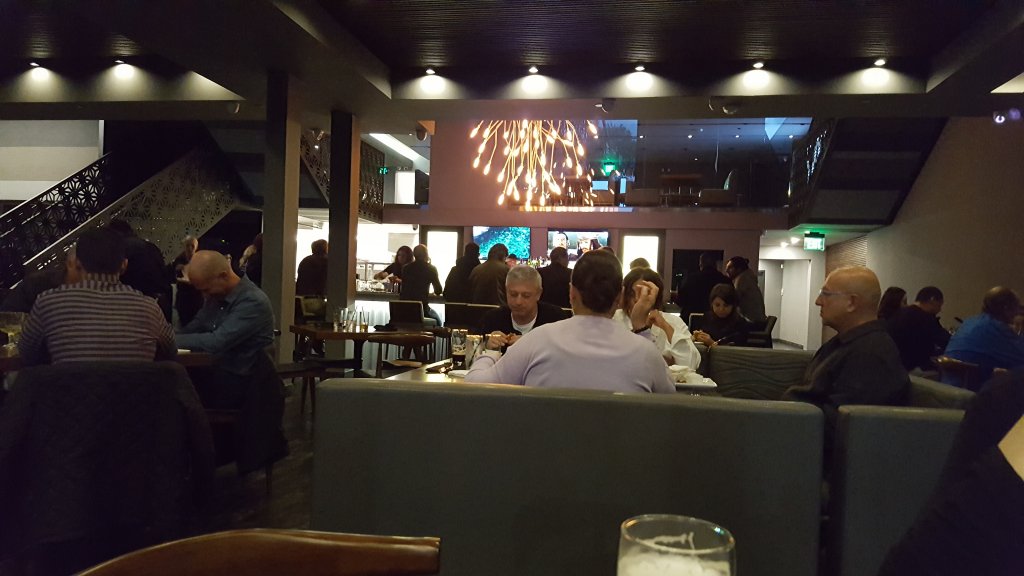
The food, while a tad on the high side for standard burger fare, is generally great and exceptionally tasty. I loved the Royal Blue burger which had just enough blue cheese to be spectacular without going overboard. Similarly their signature Black Label Burger was fantastically beefy and even juicier than the Royal Blue. Both burgers were cooked perfectly. Given their burger creativity, I'm surprised that they didn't have a Kobe beef burger on the menu.

The shoestring fries, while cooked wonderfully and garnished with just the right amount of parsley were lacking a bit in flavor and could have used some more salt.  Perhaps frying them in flavored oil or adding a light sprinkling of garlic could have lifted them to the level of the rest of the fare and the surrounding ambiance? The spicy ketchup was a nice attempt, but was far too overpowering given the flatter fries and didn't fit in with the flavor profile of the burgers. Larger ketchup vessels might make it easier to dip a burger if desired.

The appetizers were passable, but not nearly as creative as the burger options. I tried their carrot appetizer which sadly, while interesting, didn't put the carrots front and center and left them a bit overcooked.  The chefs might consider updating the appetizer menu with some more creativity or possibly swiping a few ideas from the Smith Brothers in Pasadena or Crossings in South Pasadena as this seems to be what they're chasing after, but still keep things in the mold of the high-end burger joint.

Their beer selections were nice as was the list of harder alcohols, but I'm surprised they didn't have a signature drink menu which could go a long way towards highlighting their bar for increased revenue.

The staff, while warm and welcoming still needs to up their game a tad, though hopefully this will come with time as they settle into the new space which is only about a month old.  Refinements could include: tipping customers off to the fact that the ketchup is spiced; not being so clumsy as to ask diners if they want to keep their silverware, but just bringing out new sets automatically with changes in courses (especially given the higher bar of dining that's being portrayed); pronouncing duck confit properly (it's French); and possibly suggesting beer pairings with particular burgers (if they're not going to be suggested on the menu). Check averages would also be a higher if they checked on refills or alternates during the meal as well.

I can certainly see where they're going with the ambiance and the food, and would certainly come back again. It would be a complete five star experience if they can up their game just a tad to have everything match their fine location and decor.

Also posted on Yelp.