 

Replied to a post on github.com :

You could start with http://indiewebcamp.com/Getting_Started_on_WordPress which will walk you through most of the process. You should start with the Webmention Plugin and Semantic Linkbacks to send/receive webmention support and to help comments look better respectively. Brid.gy connects your blog to responses from sites such as Facebook, Twitter, et al.

Keep in mind that some of the other plugins you'll run across may have small bugs or quirks as they're being actively developed. Most of the plugins in the WordPress.org repository are usually more stable than some you'll run across on GitHub, but those also are dated in terms of development work, so you'll have a better idea how current they are. You can usually find one or more of us via IRC, or in social media if you need help.


Replied to a post on github.com :

UI enhancement: Don't display syndication text if nothing is syndicated ·
Issue #22 · dshanske/syndication-links https://github.com/dshanske/syndication-links/issues/22

If there are no copies syndicated, the "syndicated to" (or other optional text) shouldn't display.

https://cloud.githubusercontent.com/assets/5882943/15279988/910446c4-1adf-11e6-8196-6ab6715c8037.PNG


IndieWeb and Android Mobile

@dshanske I remember you mentioning it briefly the other day and then saw something more specific this morning: http://indiewebcamp.com/irc/2016-05-03/line/1462285944410

Have you hacked around with either Bookmarklet Free or URL Forwarder apps from the Google Play store? They’re mentioned in the following two places:
https://snarfed.org/easy-indieweb-interactions-on-android
http://stream.boffosocko.com/2016/sharing-from-the-indieweb-on-mobile-android-with-apps-and

I’d gotten URL Forwarder set up and configured to make mobile sharing for my WithKnown install to make bookmarking, sharing, reposting, and a few other functionalities work incredibly quickly and well. I’ve put off doing so on WP since I have some other back-end dependencies that need tweaking so that I don’t create redundant loops with some of my other configuration. With any luck one or the other will get you pretty far without having a full micropub application.

With these you can use Android’s ubiquitous sharing icon and share to one or the other of the apps which will do the URL scraping to be able to do some of the posting types you want. Depending on the output, you may need one or two additional tweaks, but it’ll give you a reasonable template for a workflow. I’m sure some further url parameters and integration could be put in to auto checking the correct post kind and thereby making your posts fully indieweb compatible on WP. Adding Indieweb Press This https://github.com/pfefferle/wordpress-indieweb-press-this/ functionality for bookmark, share, watching, listening, et al. would complete a larger cycle of functionality.

Then, I’m sure there’s the additional functionality of API calls to Twitter/Facebook/etc. to implement the actual retweet/like on the native platform, but that could be handled later/separately (though Bridgy Publish might be able to handle this? I seem to remember a mention of it in the bookmarklet set up.)

Finally, if “Post Properties” could import the same URL and scrape the metadata, the entire process would be almost too simple and not need a “traditional” mobile app at all.

For URL Forwarder the base settings should be:
Reply: http://YOURSITENAME.com/wp-admin/press-this.php?v=8&type=reply&u=@url
Like: http://YOURSITENAME.com/wp-admin/press-this.php?v=8&type=like&u=@url
Repost: http://YOURSITENAME.com/wp-admin/press-this.php?v=8&type=repost&u=@url

Hopefully this gets you a few steps further on android mobile without a huge amount of work…


Replied to a post on github.com :

It looks like no one is maintaining this actively and the last patch was in 2014. Just keeping up with Twitter and Facebook API changes can be painful.

You might find similar functionality using a group of IndieWeb related plugins https://wordpress.org/plugins/indieweb/ much of which is in active development on GitHub as well. Documentation and additional information can be found at http://indiewebcamp.com/wordpress.

Some of the rest of the autoposting portions can be had through JetPack's Sharing functionality or alternately through NextScript's SNAP plugin: https://wordpress.org/plugins/social-networks-auto-poster-facebook-twitter-g/


Replied to a post on github.com :

Testing GitHub issue creation
https://github.com/mapkyca/KnownGithub


Is anyone else having issues with @cleverdevil's Reviews or Recipes showing up in @withknown 0.9.1? https://github.com/cleverdevil/Known-Reviews/issues


I'm curious, are you cutting and pasting your "liked" tweets posts by hand or are you using something programmatic? I'm using https://github.com/kylewm/KnownReactions, [eg: http://stream.boffosocko.com/2016/liked-rick-mendess-post-on-wwwrmendesnet-33b697a8ca] but slightly prefer that you're actually capturing the content of the tweets.


@zoonini Is there a canonical location where WordPress/Auttomatic keeps such child themes as the one you created for Pique? I've run into some sporadically on Github, but wondered if side work (with bonuses) like https://wordpress.org/support/topic/woocommerce-support-for-pique-theme?replies=26#post-8196671 lives somewhere besides a forum where it's possibly not as discoverable? Maybe it's just that I've never thought to actively look for them before, but it seems like they could have some greater long term value if the code isn't all rolled up into the primary theme.

I actually think, just for ease of use and simplicity that all themes should really come pre-packaged with child themes, but until then...

Thanks again for sharing your talents and genius!


Posted on 3/24/16:
@Kathryn and Ola, thanks for the tweaks and the child theme! I hope that Ola is dumping the code back to Sarah [https://github.com/sarahmonster/pique] or wherever you keep it internally, so that Woo support is at least partially baked in when it's released to the .org side. I'm sure it may be on the theme's internal roadmap, but don't forget to declare WooCommerce support in functions.php when the final version is rolled out.

I particularly liked the careful thought to keep the theme's buttons consistent as well as the change from 3 columns of products instead of 4. The only tweak I might further suggest is the color of the "add to cart", "proceed to checkout", and "pay" buttons (see http://boffosockobooks.com/product/amerikan-krazy/ which I've not restyled presently to highlight the existence) which all appear as purple [#a46497]. (Though the purple helps to highlight them, I wanted to make sure it was a conscious design choice rather than an oversight.) Either way, throwing the CSS code for the changes on these directly into the bundle makes it much easier for less sophisticated users to tweak the code later.

Other than that, I've looked through most portions fairly carefully and everything seems to be working as I'd expect it to without any glaring issues/errors. My thanks to you, Sarah, and Ola for the beautiful work that went into this as well as the after-the-fact adjustments.

@stephenwrks, A few things in the theme that you might consider taking advantage of and using on your current page are increasing the featured image opacity (25, 50, 75, or 100%) of the photos using the theme customizer/theme options/panels 1-8. This will let you "brighten" up your page without making the foreground text difficult to read and highlight the beauty of your photos.

You might also consider creating a secondary menu called "social" in the menu interface with custom items being links to your social media sites and then in the customizer/menu section setting the footer menu to use this menu. Then your social media bugs will appear in the footer of the page rather than into the second widget where it's at now. This will help streamline and balance out your page a bit (See the Custom Menus section at https://theme.wordpress.com/themes/pique/ and https://en.support.wordpress.com/menus/social-links-menu/ for more details.)


Good catch @dshanske! It was exactly https://github.com/jihaisse/wordpress-syndication that was the cause. I could have sworn that I'd cleaned out all of the older/legacy indieweb plugins after the "master" IndieWeb plugin was rolled out a while back, but apparently that one was quietly hiding in my plugins folder waiting to catch me.


Replied to a post on github.com :


Replied to a post on github.com :

Thanks @kylewm. This seems to have done the trick to fix the issue. ([viz.](http://stream.boffosocko.com/2016/liked-extending-press-this-in-wordpress-to-support-indieweb-reply)) You've got my vote for including KnownReactions into IDNO core if you need it!

I would consider the postability portion of this as closed. As the alternate post regarding Peter's SSL issue on https://github.com/idno/Known/issues/1360 is still being discussed, I'll leave that one open for the moment.


Sharing from the #IndieWeb on Mobile (Android) with Apps and @WithKnown

4 min read

I've been doing some work to find a better, easier, and cleaner way to share content, likes, replies, bookmarks, and reposts on mobile. In part it's what prompted me to write my post the other day about "Configuring the RSS Reader Woodwind for Known."

In part, I want to keep a complete record of posts that I "like", "share", "retweet", etc. on my own site, in keeping with the principles of the indieweb. Between separate indieweb installs of both WordPress and Known that I've been using for roughly the last two years, this hasn't been difficult on my laptop computer, primarily making use of a bevy of bookmarklet tools in my browser. In fact, on my laptop, it's down-right simple.

But not so on my Android mobile phone! In fact there, it's actually a really painful experience, and as a result I sometimes retweet, like and carry on in the Twitter app like the IndieWeb movement is dead to me. As a result I feel continually guilty and carry around a lot of . So I put out a call for help and got a few responses [1] [2] with some ideas. 

After playing around for a few days with two different apps, I thought I'd post some thoughts about the two different solutions, which to me are roughly the same.

Bookmarklet Free, which I found on Ryan Barrett's site which included some generally excellent instructions wasn't too bad.

URL Forwarder, was recommended by Tino Kremer, didn't include any instructions or hints at all.

Fortunately, both work roughly the same and the set ups aren't all too different for some of the set up for configuring Woodwind, mentioned above. Testing them out with Known allowed me to click the ubiquitous sharing icon in most Android apps that then triggered a pop-up allowing me to choose which app I want to share with.  Selecting either Bookmarklet Free or URL Forwarder then took me to an interstitial screen to let me choose whether I wanted to like, share, repost, bookmark, or reply to the particular content.

In most cases both bookmarklets did a reasonable and similar job, but typically they ended up sharing a section of unwanted text followed by a URL (and sometimes---depending on the app---another chunk of text related to the original content).  Typically I had to delete the extraneous "titling" text to leave the raw URL which Known then did a good job of reformatting properly to allow me to finish the post and send it off. (Kyle, Ryan, and Kevin had a short discussion on the handling of the "title" back in the day, which Known apparently hasn't implemented, but Ryan proffers some Github code to remedy the issue within the CMS.)

Between the two, I generally prefer the UI and set up for URL Forwarder a bit better. Both are roughly equivalent.

Since Ryan did a good job showing the configuration settings for Bookmarklet Free in his post, I'll include the similar settings for URL Forwarder for those using Known:

One need only to replace `www.yoursitenamehere.com` with their appropriate site URL.

Here, the action name, which appears first, is what I put in for the "Filter name" (field 1). The URL which follows was what I used for the "Filter url" (field 2). For each of these one should leave the "Replaceable text" field as "@url".
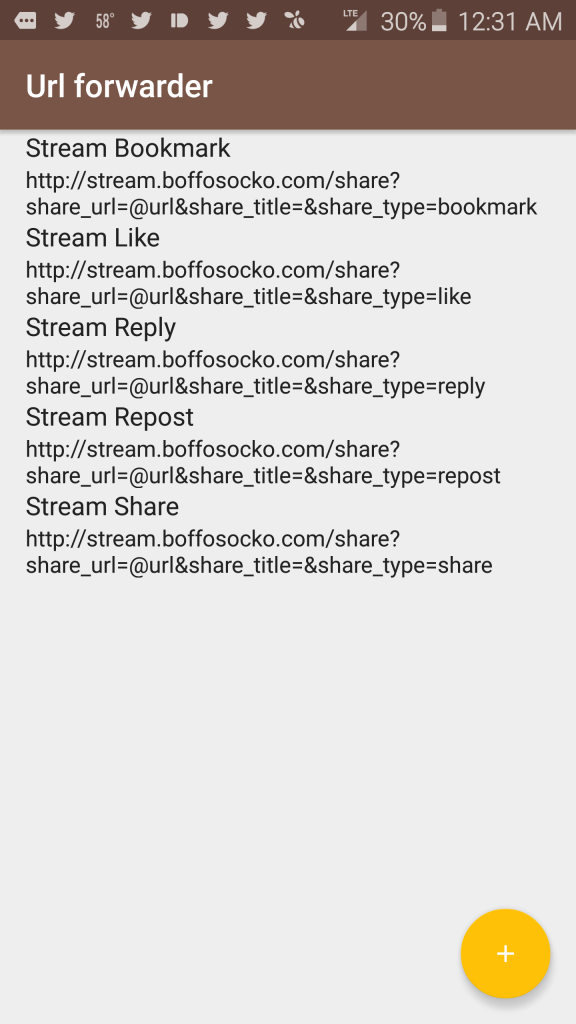
Screenshot Screenshot 2

Nota bene: I'm using the KnownReactions plugin to provide functionality for the "like" and "repost" types and that without it, these action types won't function properly on your Known installation.

Those at Known, are more than welcome to freely cut/paste/modify this for potential inclusion into their documentation for future use.

If anyone has other suggestions for improved posting via mobile, I'd certainly love to hear them!