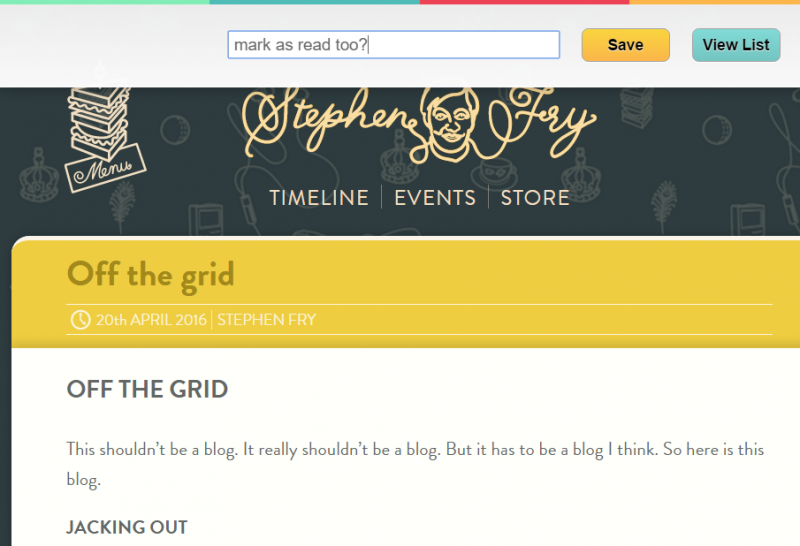
 

@Pocket #FeatureRequest: Ability to immediately mark as read with bookmarklet? #UX #UI

In some odd sense, I often use Pocket as a personal linkblog of sorts, so nearly everything I'd either like to read later or have read online ends up there. My Pocket bookmarklet, by far, has the senior-most pride of place in my browser toolbar.

While the vast majority of things I bookmark are done so to read later, every now and then, something is so compelling that I read it immediately. But I still want to save it to Pocket (almost as a bookmark functionality, particularly as it was so compelling). After using the bookmarklet to add tags and save it to my account, I'd love it if the following popup banner had a "Mark article as read" button in addition to the "View List". 

If you want to go a step further, you could add the ability to favorite that particular link as well. This would allow people to immediately highlight either important things, or additional extra-functionality for those using services like IFTTT or Zapier to API Pocket content to other platforms based on tags, favorites, or marked as read items.

Internally, with this type of functionality enabled, Pocket could also use the incoming data as an additional indicator that articles that are even more compelling than others instead of simply relying on bulk numbers of articles bookmarked to be tagged on the system as "Best of" or similar  trending types.


@RikMende I'm curious about your and hashtags. Do you revisit your site with a search for those and change them after you've read them? Do you have an alternate exterior workflow for reading later?

I usually use the "like/favorite" functionality on Twitter to "highlight" things I want to read with an IFTTT.com recipe to save the URLs from Twitter to my Pocket account for reading later. Pocket allows me to download the data from my account, so I can technically "own" it, but I'm always looking for a better workflow for this.

Curious what others use/do for this kind of work flow...


A DNA Sequencer in Every Pocket http://nzzl.us/2cHuyH7


On discovery of (good) content from the interwebs.
A short reply to @anildash @kylewmahan @tinokremer et. al

Tino, your note reminds me of Dave Winer's http://podcatch.com/ service which he built to be able to have access to interesting podcasts at any time without having to sync his phone. Sadly, I think it's a static source and not quite the tool that even https://huffduffer.com/ is and even that requires some user set up to find great material.

I remember early web efforts like Digg that were interesting for a while, but sadly services like this regress to the mean and one gets the fluff that appeals to Harry and Mary Beercan.

My favorite discovery engine lately is the Nuzzle News app from Jonathan Abrams (http://nuzzel.com/) which plugs into my social feeds and gives me articles from friends/influencers that have been mentioned several times. The value of the site is the ability to easily plug in well curated twitter lists on particular topics which then finds articles tweeted about multiple times by people I trust. I find that most of what the app uncovers is worth reading and thinking about. Rarely does it surface fluff, though I find that the articles in the friends of friends category are things that I don't care that much about.

If only we could get Nuzzle to partner with Huffduffer?!

Pocket also has a recommended tab (https://getpocket.com/a/recommended/) which is relatively useful, but it really isn't far from the simple algorithmic approach of Digg in the past.

Also, can someone please build an internet-wide filter to get rid of and the joke and fluff emails with the 1000 forwards from 1998? We'd all be a lot better off.


I'm a sucker for notebook journalism | Pocket Paper Notebook Showdown: Moleskine vs. Field Notes http://lifehacker.com/pocket-paper-notebook-showdown-moleskine-vs-field-not-1768558693


Checked into Adams Square Pocket Park

Hanging out here while Palmer Park is under construction.


+Mark van Walraven To strip cruft (ads, widgets, and other distractions) off of blog articles and general web pages for a cleaner and easier reading/concentrating experience, you might consider using Readability, which has a handy bookmarklet that you can put in your browser toolbar for quick and easy use: https://www.readability.com/bookmarklets. If you're an avid Evernote user, they have a product called Clearly that's pretty good as well: https://evernote.com/clearly/. Similarly Pocket and Instapaper have this type of functionality (with bookmarklets as well), though they typically require one to save articles to one's account first prior to reading, though this is rather handy when skimming through G+, Twitter, and Facebook feeds for interesting material one wants to read later.

+John Baez For RSS, the heir apparent to Google Reader's old product is Feedly (http://feedly.com/). There are certainly a small handful of others, but I suspect most would say that Feedly is the clear winner. They use a freemium model in which they give the majority of their useful functionality away for free and charge a small and reasonably modest subscription fee for a set of advanced functionality that most probably don't need or use. If you want to add a simple Feedly button to your blog siderail (via widget), you can find details and instructions here: http://feedly.com/factory.html

In a past life and as a side hobby, I spent several years running and building a large portion of social media for Johns Hopkins, so I've played with nearly every platform in existence. I've been pecking away for a while at blog post describing how researchers and academics can best use blogging and social media presence to improve their work & speed up their workflow - a topic that could actually be a reasonable sized book. Some of the commentary here has motivated me to get back to it presently.


@pocket What's the difference between the "pocket" and "save to pocket" chrome apps?