 

My answer to "What is your review of LiveJournal? - Quora"

It’s definitely not a good platform from an IndieWeb (http://IndieWeb.org) perspective. The details on the wiki entry at Indieweb pretty much say it all from a flexibility and long term perspective: LiveJournal - IndieWeb (https://indieweb.org/livejournal). You’d be better off with your own personal site and then cross-publishing to LiveJournal if you have a particular audience there that you want to reach and it’s worth spending the money.

If you’re choosing a platform, perhaps take a look at projects (https://indieweb.org/projects). For beginners looking for something simple and inexpensive as well as easy to maintain, I’d recommend WordPress.org (http://WordPress.org) or Known (http://WithKnown.com). These will be better at allowing you to own your own domain and own your own data while still offering a large number of more modern blogging/web features.

Other resources:
* Getting Started - IndieWeb (https://indieweb.org/Getting_Started)
* Transitional Steps (https://indieweb.org/Transitional_Steps)


@pvagner It is if it's @withknown!


@egoexpress @rickmende I love the idea of this! Just did a PR to add it to the @withknown community plugins page docs.withknown.com/en/latest/plugins/community/


I've updated Twitter, LinkedIn and Reactions to the latest versions on @withknown


If you haven't seen the longer list of plugins, take a look at this: http://docs.withknown.com/en/latest/plugins/community/

I know there are a small handful that aren't yet listed, but primarily it's because they're not stable, or the authors prefer to keep them under wraps.


I'm now trying out https://ownyourgram.com/ on WithKnown and it seems to work fairly well so far: http://stream.boffosocko.com/2016/ceiling-with-great-lighting-hardware

We'll see if we can't get the comments from Instagram to flow back as well.


IndieWeb and Android Mobile

@dshanske I remember you mentioning it briefly the other day and then saw something more specific this morning: http://indiewebcamp.com/irc/2016-05-03/line/1462285944410

Have you hacked around with either Bookmarklet Free or URL Forwarder apps from the Google Play store? They’re mentioned in the following two places:
https://snarfed.org/easy-indieweb-interactions-on-android
http://stream.boffosocko.com/2016/sharing-from-the-indieweb-on-mobile-android-with-apps-and

I’d gotten URL Forwarder set up and configured to make mobile sharing for my WithKnown install to make bookmarking, sharing, reposting, and a few other functionalities work incredibly quickly and well. I’ve put off doing so on WP since I have some other back-end dependencies that need tweaking so that I don’t create redundant loops with some of my other configuration. With any luck one or the other will get you pretty far without having a full micropub application.

With these you can use Android’s ubiquitous sharing icon and share to one or the other of the apps which will do the URL scraping to be able to do some of the posting types you want. Depending on the output, you may need one or two additional tweaks, but it’ll give you a reasonable template for a workflow. I’m sure some further url parameters and integration could be put in to auto checking the correct post kind and thereby making your posts fully indieweb compatible on WP. Adding Indieweb Press This https://github.com/pfefferle/wordpress-indieweb-press-this/ functionality for bookmark, share, watching, listening, et al. would complete a larger cycle of functionality.

Then, I’m sure there’s the additional functionality of API calls to Twitter/Facebook/etc. to implement the actual retweet/like on the native platform, but that could be handled later/separately (though Bridgy Publish might be able to handle this? I seem to remember a mention of it in the bookmarklet set up.)

Finally, if “Post Properties” could import the same URL and scrape the metadata, the entire process would be almost too simple and not need a “traditional” mobile app at all.

For URL Forwarder the base settings should be:
Reply: http://YOURSITENAME.com/wp-admin/press-this.php?v=8&type=reply&u=@url
Like: http://YOURSITENAME.com/wp-admin/press-this.php?v=8&type=like&u=@url
Repost: http://YOURSITENAME.com/wp-admin/press-this.php?v=8&type=repost&u=@url

Hopefully this gets you a few steps further on android mobile without a huge amount of work…


What? No love for 0.9.2 Derbyshire?! :)
Seriously though, congratulations!! @withknown


Is anyone else having issues with @cleverdevil's Reviews or Recipes showing up in @withknown 0.9.1? https://github.com/cleverdevil/Known-Reviews/issues


@withknown Makes me wonder which other Easter Eggs I'm missing??? and Easter is coming up... (hint, hint)


Replied to a post on github.com :


Sharing from the #IndieWeb on Mobile (Android) with Apps and @WithKnown

4 min read

I've been doing some work to find a better, easier, and cleaner way to share content, likes, replies, bookmarks, and reposts on mobile. In part it's what prompted me to write my post the other day about "Configuring the RSS Reader Woodwind for Known."

In part, I want to keep a complete record of posts that I "like", "share", "retweet", etc. on my own site, in keeping with the principles of the indieweb. Between separate indieweb installs of both WordPress and Known that I've been using for roughly the last two years, this hasn't been difficult on my laptop computer, primarily making use of a bevy of bookmarklet tools in my browser. In fact, on my laptop, it's down-right simple.

But not so on my Android mobile phone! In fact there, it's actually a really painful experience, and as a result I sometimes retweet, like and carry on in the Twitter app like the IndieWeb movement is dead to me. As a result I feel continually guilty and carry around a lot of . So I put out a call for help and got a few responses [1] [2] with some ideas. 

After playing around for a few days with two different apps, I thought I'd post some thoughts about the two different solutions, which to me are roughly the same.

Bookmarklet Free, which I found on Ryan Barrett's site which included some generally excellent instructions wasn't too bad.

URL Forwarder, was recommended by Tino Kremer, didn't include any instructions or hints at all.

Fortunately, both work roughly the same and the set ups aren't all too different for some of the set up for configuring Woodwind, mentioned above. Testing them out with Known allowed me to click the ubiquitous sharing icon in most Android apps that then triggered a pop-up allowing me to choose which app I want to share with.  Selecting either Bookmarklet Free or URL Forwarder then took me to an interstitial screen to let me choose whether I wanted to like, share, repost, bookmark, or reply to the particular content.

In most cases both bookmarklets did a reasonable and similar job, but typically they ended up sharing a section of unwanted text followed by a URL (and sometimes---depending on the app---another chunk of text related to the original content).  Typically I had to delete the extraneous "titling" text to leave the raw URL which Known then did a good job of reformatting properly to allow me to finish the post and send it off. (Kyle, Ryan, and Kevin had a short discussion on the handling of the "title" back in the day, which Known apparently hasn't implemented, but Ryan proffers some Github code to remedy the issue within the CMS.)

Between the two, I generally prefer the UI and set up for URL Forwarder a bit better. Both are roughly equivalent.

Since Ryan did a good job showing the configuration settings for Bookmarklet Free in his post, I'll include the similar settings for URL Forwarder for those using Known:

One need only to replace `www.yoursitenamehere.com` with their appropriate site URL.

Here, the action name, which appears first, is what I put in for the "Filter name" (field 1). The URL which follows was what I used for the "Filter url" (field 2). For each of these one should leave the "Replaceable text" field as "@url".
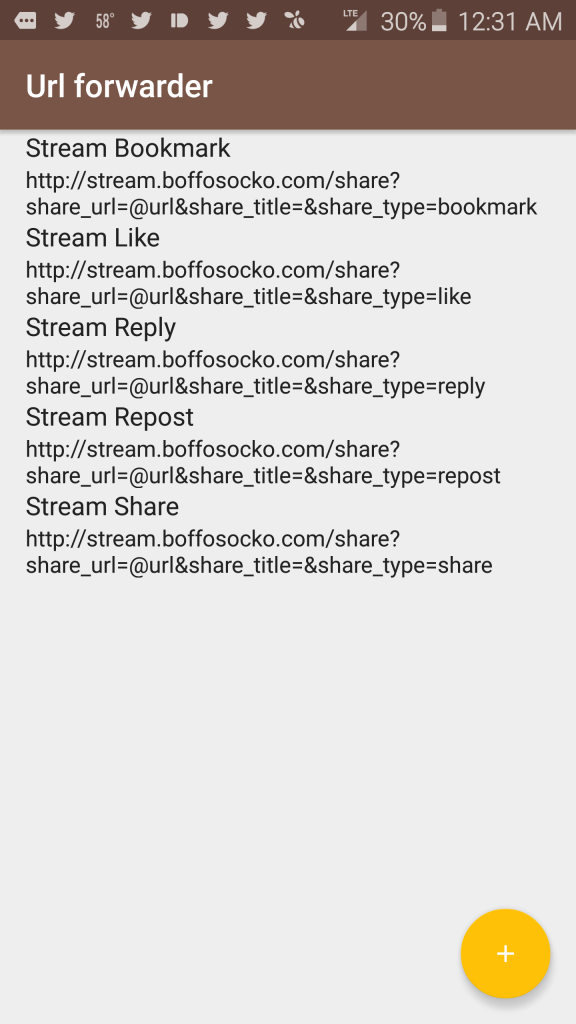
Screenshot Screenshot 2

Nota bene: I'm using the KnownReactions plugin to provide functionality for the "like" and "repost" types and that without it, these action types won't function properly on your Known installation.

Those at Known, are more than welcome to freely cut/paste/modify this for potential inclusion into their documentation for future use.

If anyone has other suggestions for improved posting via mobile, I'd certainly love to hear them!


Kyle, you should also obviously steal any/all parts of this post for Woodwind's "manual" if you like: http://stream.boffosocko.com/2016/configuring-the-indieweb-rss-reader-woodwind-for-withknown