Biomedical and Electrical Engineer with interests in information theory, evolution, genetics, abstract mathematics, microbiology, big history, IndieWeb, mnemonics, and the entertainment industry including: finance, distribution, representation

boffosocko.com

chrisaldrich

chrisaldrich

+13107510548

chris@boffosocko.com

stream.boffosocko.com

www.boffosockobooks.com

chrisaldrich

mastodon.social/@chrisaldrich

micro.blog/chrisaldrich


Description and FAQ for IndieWeb WordPress Plugin

5 min read

I just wrote up a quick description for the IndieWeb plugin for WordPress. As a native IndieWebber, I thought I'd PESOS it from GitHub and share it out for those who might be interested. It's also a somewhat self-contained description why one should join the movement and points to some great resources.

Description

The IndieWeb Plugin for Wordpress is a bundled installer for a core set of IndieWeb-related plugins. It's meant to be a one-stop shop to help WordPress users quickly and easily join the growing IndieWeb movement (see below). Some of these sub-plugins are required while others are optional.

Some of these plugins allow you to:

  • send and receive comments, likes, reposts, and other kinds of post responses using your own site
  • allow comments on others' sites to show up as comments on your posts
  • help make IndieWeb comments and mentions look better on your site
  • allow support for threaded comments and webmentions
  • more easily syndicate your content to other sites to take advantage of network effects and other communities while still owning all of your original content
  • link to syndicated versions of a post so that comments on your content in silos like Facebook, Twitter, Instagram, Google+ can come back to your original post as comments there
  • allow you to add bookmarklets to easily respond/comment on other sites with one click
  • set up a MicroPub Server to use other posting interfaces. (You could potentially use services like Instagram, Foursquare, and others to post to your WordPress site.)
  • set up a personal URL shortener
  • log into your WordPress site with services like Twitter, GitHub, SMS, or even email using IndieAuth.

The IndieWeb

The IndieWeb is a people-focused alternative to the ‘corporate web’ that allows you to be the humb of your own web presence. It's been written about in Wired, The Atlantic, Slate, and Gigaom amongst others.

The IndieWeb, like WordPress, feels that your content is yours

When you post something on the web, it should belong to you, not a corporation. Too many companies have gone out of business and lost all of their users’ data. By joining the IndieWeb, your content stays yours and in your control.

The IndieWeb is here to help you be better connected

Your articles and status messages can be syndicated to all services, not just one, allowing you to engage with everyone in your social network/social graph. Even replies and likes on other services can come back to your site so they’re all in one place.

Interested in connecting your WordPress site to the IndieWeb? Let us help you get started.

Frequently Asked Questions

How do I get Started?

IndieWeb for WordPress includes a plugin installer program. A Getting Started Guide can be found under Plugins->IndieWeb.

Where can I find help? Can I contribute?

A group of web developers (including those knowledgeable about WordPress, among many other web technologies) can be found discussing and working on IndieWeb related technologies in the wiki at IndieWebCamp.com or in the IRC on Freenode. WordPress specific portions of the IndieWeb camp can be found at WordPress, Getting Started on WordPress, Examples, and other plugins.

If you need additional assistance, feel free to reach out to any of the WordPress Outreach Club members via the website, our individual websites, or our social media presences -- we're happy to help!

Why IndieWeb?

Find more information and details for the motivations for joining the IndieWeb at http://indiewebcamp.com/Why

What about plugin XYZ?

If you think we missed a plugin reference, please file an issue on Github.

What plugins are included in this package? Can I install them separately?

  • Webmention (Required) - allows you to send and receive by adding webmention support to WordPress. Mentions show up as comments on your site.
  • Semantic Linkbacks (Required) - makes IndieWeb comments and mentions look better on your site.
  • Webmention for (Threaded) Comments - Adds support for threaded comments for webmentions.
  • Webactions - Adds webaction markups to WordPress elements.
  • Post Kinds - Allows you to reply/like/RSVP etc to another site from your own, by adding support for kinds of posts to WordPress.
  • Syndication Links - Adds fields to a post to allow manual entry of syndication links as well as automatically from a supported syndication plugin. Fully supports Social, partial support for NextScripts: Social Networks Auto-Poster (aka SNAP).
  • MicroPub - A MicroPub Server
  • IndieWeb Press-This - Adds IndieWeb markup to the WordPress Press-This bookmarkets to allow you to respond on your site with one-click.
  • Hum URL Shortener - A personal URL shortener.
  • Indieauth - The plugin lets you login to the WordPress backend via IndieAuth. It uses the URL from the profile page to identify the blog user.

One could certainly download, install, and activate some or all of these plugins separately, but it is much quicker and easier to utilize the interface provided by this IndieWeb plugin to install and activate them. Note that some of these plugins may only be available on GitHub and are not yet on WordPress.org.


Also posted to GitHub:

wordpress-indieweb/readme.md at ee1cfb72203f1feef05b9225c4bb465abc82e094 · chrisaldrich/wordpress-indieweb https://github.com/chrisaldrich/wordpress-indieweb/blob/ee1cfb72203f1feef05b9225c4bb465abc82e094/readme.md


Sharing from the #IndieWeb on Mobile (Android) with Apps and @WithKnown

4 min read

I've been doing some work to find a better, easier, and cleaner way to share content, likes, replies, bookmarks, and reposts on mobile. In part it's what prompted me to write my post the other day about "Configuring the RSS Reader Woodwind for Known."

In part, I want to keep a complete record of posts that I "like", "share", "retweet", etc. on my own site, in keeping with the principles of the indieweb. Between separate indieweb installs of both WordPress and Known that I've been using for roughly the last two years, this hasn't been difficult on my laptop computer, primarily making use of a bevy of bookmarklet tools in my browser. In fact, on my laptop, it's down-right simple.

But not so on my Android mobile phone! In fact there, it's actually a really painful experience, and as a result I sometimes retweet, like and carry on in the Twitter app like the IndieWeb movement is dead to me. As a result I feel continually guilty and carry around a lot of . So I put out a call for help and got a few responses [1] [2] with some ideas. 

After playing around for a few days with two different apps, I thought I'd post some thoughts about the two different solutions, which to me are roughly the same.

Bookmarklet Free, which I found on Ryan Barrett's site which included some generally excellent instructions wasn't too bad.

URL Forwarder, was recommended by Tino Kremer, didn't include any instructions or hints at all.

Fortunately, both work roughly the same and the set ups aren't all too different for some of the set up for configuring Woodwind, mentioned above. Testing them out with Known allowed me to click the ubiquitous sharing icon in most Android apps that then triggered a pop-up allowing me to choose which app I want to share with.  Selecting either Bookmarklet Free or URL Forwarder then took me to an interstitial screen to let me choose whether I wanted to like, share, repost, bookmark, or reply to the particular content.

In most cases both bookmarklets did a reasonable and similar job, but typically they ended up sharing a section of unwanted text followed by a URL (and sometimes---depending on the app---another chunk of text related to the original content).  Typically I had to delete the extraneous "titling" text to leave the raw URL which Known then did a good job of reformatting properly to allow me to finish the post and send it off. (Kyle, Ryan, and Kevin had a short discussion on the handling of the "title" back in the day, which Known apparently hasn't implemented, but Ryan proffers some Github code to remedy the issue within the CMS.)

Between the two, I generally prefer the UI and set up for URL Forwarder a bit better. Both are roughly equivalent.

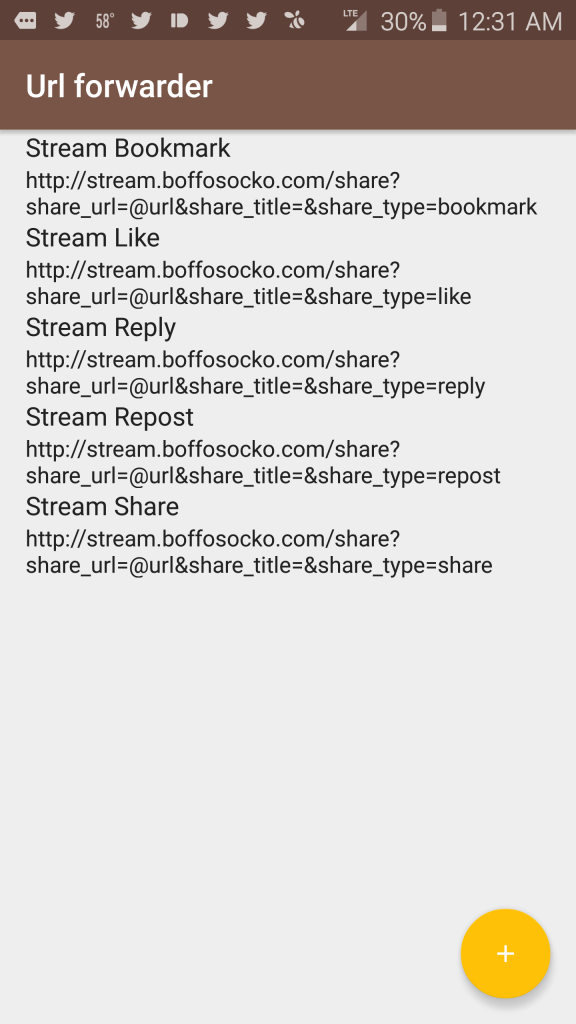
Since Ryan did a good job showing the configuration settings for Bookmarklet Free in his post, I'll include the similar settings for URL Forwarder for those using Known:

One need only to replace `www.yoursitenamehere.com` with their appropriate site URL.

Here, the action name, which appears first, is what I put in for the "Filter name" (field 1). The URL which follows was what I used for the "Filter url" (field 2). For each of these one should leave the "Replaceable text" field as "@url".

Screenshot Screenshot 2

Nota bene: I'm using the KnownReactions plugin to provide functionality for the "like" and "repost" types and that without it, these action types won't function properly on your Known installation.

Those at Known, are more than welcome to freely cut/paste/modify this for potential inclusion into their documentation for future use.

If anyone has other suggestions for improved posting via mobile, I'd certainly love to hear them!


Updating @WithKnown Past 0.7.7 and Keeping Social Media Integration

3 min read

Last night I upgraded my WithKnown installation from 0.7.5 to 0.7.7.1 and was shocked to see all of the social media integration of my instance had completely disappeared!  

Suddenly POSSE wasn't POSS-I-ble!

Starting with 0.7.7, Known had taken out the old social media plugins and replaced them with Convoy. While I'm sure Convoy is awesome and makes social media integration for POSSE dead simple, something in my gut told me that it just wasn't for me.  I also didn't want to throw away the hour or so I spent configuring all of the plugins in the first place only to end up paying $50 a year for the same thing I'd already had. Those who haven't dealt with it already, will probably find Convoy a great value, though it'd probably be better billed as a one-time fee rather than a recurring one.

I'll admit that I panicked for a while and contemplated restoring the original 0.7.5 server code from back-up.

Fortunately a cooler head prevailed and some research and internet searching began.  I didn't find much immediately - the drawback of living so close to the bleeding edge of technology when still learning how all of it works.

I tried to see if I could uninstall the Convoy plugin by going into the site configurations and changing the plugin to disable it. Sadly, of the dozen or so plugins, Convoy is the only one that didn't ship with an "enable"/"disable" button. I'm sure they'll fix this shortly, but for those who want to do it manually, simply add the following line of code to your config.ini file:

     antiplugins[] = 'Convoy'

Screen capture of Plugins Settings Page

Eventually, I spent some time digging into the code and comparing/contrasting all the files.  Noticing that 0.7.6 had six or so additional folders for each of the social media plugins hiding within the IdnoPlugins folder (Facebook, Twitter, Flickr, SoundCloud, etc.), I simply dragged and dropped all of those over into 0.7.7.1 and voila! We're back up and running.

As a fine point, one should notice that both the FourSquare and Twitter plugins have been updated since 0.7.6, so they should be copied and dragged over from the main GitHub repository.  Following a similar procedure will also need to be watched/followed for future updates on occasion as well.

For future UX, I'm hoping that Known will at least as a minimum install and make Convoy available directly, but that disabling it will make the other original plugins viewable and configurable for the more technically minded, particularly as POSSE is one of the cornerstones of the IndieWeb movement.

As a quick recap for those doing general Known upgrades, try the following:

  1. Back up your database and your code, just in case;
  2. Download the new repository (either GitHub or on WithKnown);
  3. Delete the "dummy" Uploads folder from the new install and keep your original on the server which has all of your photos, etc.;
  4. Keep your config.ini; 
  5. Keep your .htaccess (unless it needs a serious change; the htaccess.dist replacement file can be easily copied over, but will need to have its name changed from the version with the .dist extension);
  6. Keep the social media plugin folders in IdnoPlugins that you intend to continue using; or upload newer versions which are availble from https://github.com/idno ​;
  7. Upload all the new files to the server directory.

Those with an adventurous spirit may also find some of the other available plugins fun to play around with too.


Upgrading @WithKnown on One's Own Server

3 min read

It's only been a short time since I installed my own copy of WithKnown (GitHub) and there have been a few small upgrades since that time, but I was overdue for upgrading. I'd also seen one or two errors when posting, and figured that the small bugs I was seeing would have been worked out.

When I went to upgrade earlier in the week, I figured I'd wing it since at the time there weren't any instructions for upgrading in the documentation (or at least that I'd noticed at the time.)  Somehow I got sidetracked and finally just came back to it today.  Following the general procedure for upgrading projects like Drupal and WordPress, I trundled along and found generally reasonable results until I realized that URLs weren't mapping quite properly, photos were missing, and something was a bit "off". (I had tried reinstalling my original config.ini file along with the Uploads file, but that didn't seem to work somehow.)

I went back to check the documentation, and lo-and-behold, in the intervening week,  there are now some scant upgrade instructions available which follow below: 

Upgrading Known is designed to be very simple.

  • Take a backup of your Known directory and database.
  • Overwrite your Known files except your upload directory.
  • Access your Known site homepage.

I was reticent upon visiting my homepage as I received a splash screen exactly like the original set up, and was very worried that I might manage to blow out some of the primary data and crash the whole thing. (I did remember to do a back up before starting, but who wants to deal with that if they don't have to.)

I decided to plunge ahead and proceeded like I was setting things up for the first time. I was directed to a page to enter in the database name, login, password, etc., which creates a config.ini file in the root, and was then redirected to my site, with all the links and data perfectly intact and functioning properly. 

For those who haven't done it themselves, and have the same reticence I did, I'd recommend adding a few additional steps to the process:

4. Click on the set up button

5. Enter in your database name, user name, host name and password

6. Update the path for the "Uploads" folder. (It may automatically default to the proper path name, but double check it.)

7. Hit enter and you'll be taken to your site.

Depending on what one is using for the update, I might also recommend blowing out (deleting) the original Known files in your root directory in step 2, and installing the new ones rather than simple overwriting so one isn't left with out of date files.