
Biomedical and Electrical Engineer with interests in information theory, evolution, genetics, abstract mathematics, microbiology, big history, IndieWeb, mnemonics, and the entertainment industry including: finance, distribution, representation

boffosocko.com

chrisaldrich

chrisaldrich

+13107510548

chris@boffosocko.com

stream.boffosocko.com

www.boffosockobooks.com

chrisaldrich

mastodon.social/@chrisaldrich

micro.blog/chrisaldrich


Expanding Ekphrasis to the Broader Field of Mnemotechny: or How the Shield of Achilles Relates to a Towel, Car, and Water Buffalo

3 min read

If Lynne Kelly's thesis about the methods of memory used by indigenous peoples is correct, and I strongly believe it is, then the concept of ekphrasis as illustrated in the description of the Shield of Achilles in Homer's Iliad (Book 18, lines 478–608) is far more useful than we may have previously known. I strongly suspect that Achilles' Shield is an early sung version of a memory palace to which were once attached other (now lost) memories from Bronze Age Greece.

The word ekphrasis, or ecphrasis, comes from the Greek for the description of a work of art produced as a rhetorical exercise, often used in the adjectival form ekphrastic.—Wikipedia

While many may consider this example of Homer's to be the first instance of ekphrasis within literature (primarily because it specifically depicts an artwork, which is part of the more formal definition of the word), I would posit that even earlier descriptions in the Iliad itself which go into great detail about individuals and their methods of death are also included in a broader conception of ekphrasis. This larger ekphrasis subsumes all of these descriptions in an tradition of orality as being portions of ancient memory palaces within a broader field of mnemotechny. I imagine that these graphic, bloody, and larger-than-life depictions of death not only encoded the names and ideas of the original people/ancestors, but they were also quite likely to have had additional layers of memory encoded (or attached) to them as well. Here I'm suggesting that while an actual shield may or may not have originally existed that even once the physical shield or other object is gone or lost that the remembered story of the shield still provides a memory palace to which other ideas can be attached.

(I'll remind the forgetful reader than mnemotechny grows out of the ancient art of rhetoric as envisioned in Rhetorica ad Herennium, and thus the use of ekphrasis as a rhetorical device implicitly subsumes the idea of memory, though most modern readers may not have that association.)

Later versions of ekphrasis in post-literate history may have been more about the arts themselves and related references and commentary (example: Keats' Ode on a Grecian Urn), but I have a strong feeling that this idea's original incarnation was more closely related to early memory methods at the border of oral and literate societies.

In other words, ancient performers, poets, etc. may have created their own memory palaces by which they were able to remember long stories like the Iliad, but what is to say that these stories themselves weren't in turn memory palaces to the listeners themselves? I myself have previously used the plot and portions of the movie Fletch as a meta memory palace in just this way. As the result of ritualistic semi-annual re-watchings of classic and engaging movies like this, I can dramatically expand my collection of memory palaces. The best part is that while my exterior physical location may change, classics movies will always stay the same. And in a different framing, my memories of portions of history may also help me recall a plethora of famous movie quotes as well.

Can I borrow your towel? My car just hit a water buffalo.—Irwin M. Fletcher
 

Trying to use a New Post in Known to Reply to Jeremy Cherfas

1 min read

If one is careful and marks up the html just so, then I suspect that Known will allow you to create a post and have it show as a reply. This post (and not a status update or a reply post) will serve as a test.

Of course, I'm not sure how one would add the proper class of u-in-reply-to with markup, but I'll bet someone somewhere does this in a way that Jeremy could potentially replicate.


I've updated my WithKnown install to v0.9.9 Derbyshire!

2 min read

Aside from one or two custom CSS tweaks, everything seems to be looking and working as expected! If readers or users see or experience any issues, please let me know.

I can't wait to try out all of the new core features and improvements that have arrived since 0.9.2! Including:

  • A simpler user registration experience
  • Fixed image preview rotation
  • Improved indieweb support (including for likes and reposts)
  • Improved migration support
  • Advanced access control internal API
  • Design and layout fixes
  • Better error pages
  • Support for PHP 7
  • Countless fixes and speed improvements in the background

You can get your own version of one of the best, most modern, and most forward-thinking Content Management Systems on the planet by contacting the fantastic team at https://withknown.com/. Or host your own version: https://withknown.com/opensource/ with lots of community developed plugins.

If you've already got Known and haven't upgraded, I've previously written up an outline about the upgrade process.

Coming up soon, I'll be upgrading my Known testing ground at http://known.boffosocko.com/ which, in some sense, is its own social media site, but also allows users to sign up for an account to test drive some of the core functionality in addition to syndicating their content to sites like Twitter and also backfeed their comments back from Twitter. For ease of use, I recommend setting up the bookmarklet after creating your account.

The 1.0 version of Known is anticipated some time in June 2017, but to be honest, in the almost three years I've been using it, it's been both fantastic and rock solid.


Adding a photo to a Known "Post"

1 min read

Known has several post types, each of which is good for particular content types. Sadly, one can't add photos to statuses or replies, though one could accomplish much the same thing with a photo post type.

In a "Post" type, one may need to switch from the plain text editor to the rich text editor to be able to insert a photo by clicking on the photo icon in the toolbar which only appears on the rich text editor. A modal window will then open up that will allow you to upload a photo and add metadata about it prior to inserting it into your post.

Tip: selecting the image in the post and re-clicking on the photo icon will allow you to edit the image source, description, and dimensions. 


Sharing from the #IndieWeb on Mobile (Android) with Apps and @WithKnown

4 min read

I've been doing some work to find a better, easier, and cleaner way to share content, likes, replies, bookmarks, and reposts on mobile. In part it's what prompted me to write my post the other day about "Configuring the RSS Reader Woodwind for Known."

In part, I want to keep a complete record of posts that I "like", "share", "retweet", etc. on my own site, in keeping with the principles of the indieweb. Between separate indieweb installs of both WordPress and Known that I've been using for roughly the last two years, this hasn't been difficult on my laptop computer, primarily making use of a bevy of bookmarklet tools in my browser. In fact, on my laptop, it's down-right simple.

But not so on my Android mobile phone! In fact there, it's actually a really painful experience, and as a result I sometimes retweet, like and carry on in the Twitter app like the IndieWeb movement is dead to me. As a result I feel continually guilty and carry around a lot of . So I put out a call for help and got a few responses [1] [2] with some ideas. 

After playing around for a few days with two different apps, I thought I'd post some thoughts about the two different solutions, which to me are roughly the same.

Bookmarklet Free, which I found on Ryan Barrett's site which included some generally excellent instructions wasn't too bad.

URL Forwarder, was recommended by Tino Kremer, didn't include any instructions or hints at all.

Fortunately, both work roughly the same and the set ups aren't all too different for some of the set up for configuring Woodwind, mentioned above. Testing them out with Known allowed me to click the ubiquitous sharing icon in most Android apps that then triggered a pop-up allowing me to choose which app I want to share with.  Selecting either Bookmarklet Free or URL Forwarder then took me to an interstitial screen to let me choose whether I wanted to like, share, repost, bookmark, or reply to the particular content.

In most cases both bookmarklets did a reasonable and similar job, but typically they ended up sharing a section of unwanted text followed by a URL (and sometimes---depending on the app---another chunk of text related to the original content).  Typically I had to delete the extraneous "titling" text to leave the raw URL which Known then did a good job of reformatting properly to allow me to finish the post and send it off. (Kyle, Ryan, and Kevin had a short discussion on the handling of the "title" back in the day, which Known apparently hasn't implemented, but Ryan proffers some Github code to remedy the issue within the CMS.)

Between the two, I generally prefer the UI and set up for URL Forwarder a bit better. Both are roughly equivalent.

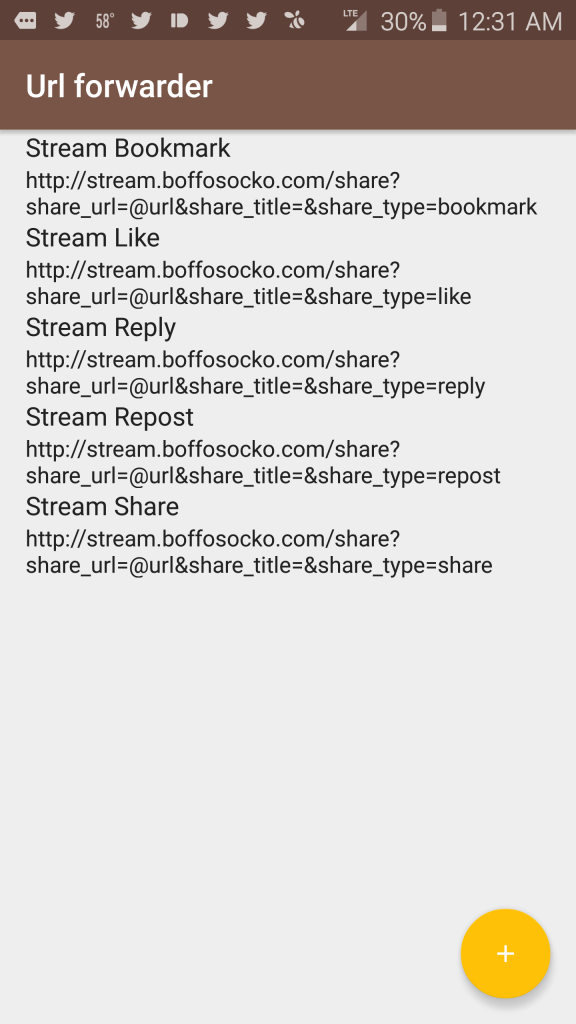
Since Ryan did a good job showing the configuration settings for Bookmarklet Free in his post, I'll include the similar settings for URL Forwarder for those using Known:

One need only to replace `www.yoursitenamehere.com` with their appropriate site URL.

Here, the action name, which appears first, is what I put in for the "Filter name" (field 1). The URL which follows was what I used for the "Filter url" (field 2). For each of these one should leave the "Replaceable text" field as "@url".

Screenshot Screenshot 2

Nota bene: I'm using the KnownReactions plugin to provide functionality for the "like" and "repost" types and that without it, these action types won't function properly on your Known installation.

Those at Known, are more than welcome to freely cut/paste/modify this for potential inclusion into their documentation for future use.

If anyone has other suggestions for improved posting via mobile, I'd certainly love to hear them!


Configuring the #IndieWeb RSS Reader Woodwind for @WithKnown

4 min read

Woodwind (so, named because it's part of the "reed/read" family), is a nice little RSS program for following and interacting with blogs and sites as part of one's regimen.

Today, I began setting it up in conjunction with my self-hosted Known [download] site which also has Kyle Mahan's "KnownReactions" plugin installed. This plugin allows me to "like" and "repost" content on the web in addition to Known's built in "share", "bookmark", and "reply" functionality.

I played around on my Known site with some various options to configure Woodwind which has several built in reply mechanisms available:

Reply Mechanism

  Each post will have Like, Repost, and Reply buttons that will post content to your site directly via micropub. See Micropub for details.

  Clicking an indie-action link will invoke your web+action handler if registered. See indie-configfor details.

  Manually configure your own web action handlers. The placeholder {url} will be replaced with the permalink URL of each entry.

These variations are primarily based upon the type of site and architecture you're using to take the content from the reader and post it to your own site.

I tried out Micropub, which Known supports automatically, and liked the interface, but it didn't give me as much flexibility as I would have liked in terms of post types. (The stars it posts up for likes are a tad unwieldly too.) I'm honestly not sure if Known supports the Indie-config option, though my guess is that it doesn't. (I'm thinking that building a WordPress plugin to allow easy plug-and-play for Indie-config would be fun on an alternate CMS platform, but I'd guess that David Shanske likely already has.)

I finally messed around for a while with trying to get the Configurable action urls option working on my Known site. It seems to be working pretty well now, so I thought I'd pass along the very simple hack so that others who are less tenatious can relatively easily cut and paste the solution to get their Woodwind configuration humming more quickly.

Each action get's a title, which appears on the associated buttons within Woodwind, which is followed by a custom url.  I'll list the most common ones for Known below:

One need only to replace `www.yoursitenamehere.com` with the appropriate site URL, thus in my case for the "Share" button, I used `http://stream.boffosocko.com/share?share_url={url}&share_title=&share_type=note`.

I imagine that one could also use this general format to create buttons within Woodwind to post comics, recipes, and even reviews using the community plugins for Known, though it's likely that some of these plugins may need some tweaks to work properly.

Again, I'll note that I'm using the KnownReactions plugin to provide functionality for the "like" and "repost" types and that without it, these buttons won't function properly on your installation.

Those at Known, are more than welcome to freely cut/paste/modify this for potential inclusion into their documentation for future use.


Updating @WithKnown Past 0.7.7 and Keeping Social Media Integration

3 min read

Last night I upgraded my WithKnown installation from 0.7.5 to 0.7.7.1 and was shocked to see all of the social media integration of my instance had completely disappeared!  

Suddenly POSSE wasn't POSS-I-ble!

Starting with 0.7.7, Known had taken out the old social media plugins and replaced them with Convoy. While I'm sure Convoy is awesome and makes social media integration for POSSE dead simple, something in my gut told me that it just wasn't for me.  I also didn't want to throw away the hour or so I spent configuring all of the plugins in the first place only to end up paying $50 a year for the same thing I'd already had. Those who haven't dealt with it already, will probably find Convoy a great value, though it'd probably be better billed as a one-time fee rather than a recurring one.

I'll admit that I panicked for a while and contemplated restoring the original 0.7.5 server code from back-up.

Fortunately a cooler head prevailed and some research and internet searching began.  I didn't find much immediately - the drawback of living so close to the bleeding edge of technology when still learning how all of it works.

I tried to see if I could uninstall the Convoy plugin by going into the site configurations and changing the plugin to disable it. Sadly, of the dozen or so plugins, Convoy is the only one that didn't ship with an "enable"/"disable" button. I'm sure they'll fix this shortly, but for those who want to do it manually, simply add the following line of code to your config.ini file:

     antiplugins[] = 'Convoy'

Screen capture of Plugins Settings Page

Eventually, I spent some time digging into the code and comparing/contrasting all the files.  Noticing that 0.7.6 had six or so additional folders for each of the social media plugins hiding within the IdnoPlugins folder (Facebook, Twitter, Flickr, SoundCloud, etc.), I simply dragged and dropped all of those over into 0.7.7.1 and voila! We're back up and running.

As a fine point, one should notice that both the FourSquare and Twitter plugins have been updated since 0.7.6, so they should be copied and dragged over from the main GitHub repository.  Following a similar procedure will also need to be watched/followed for future updates on occasion as well.

For future UX, I'm hoping that Known will at least as a minimum install and make Convoy available directly, but that disabling it will make the other original plugins viewable and configurable for the more technically minded, particularly as POSSE is one of the cornerstones of the IndieWeb movement.

As a quick recap for those doing general Known upgrades, try the following:

  1. Back up your database and your code, just in case;
  2. Download the new repository (either GitHub or on WithKnown);
  3. Delete the "dummy" Uploads folder from the new install and keep your original on the server which has all of your photos, etc.;
  4. Keep your config.ini; 
  5. Keep your .htaccess (unless it needs a serious change; the htaccess.dist replacement file can be easily copied over, but will need to have its name changed from the version with the .dist extension);
  6. Keep the social media plugin folders in IdnoPlugins that you intend to continue using; or upload newer versions which are availble from https://github.com/idno ​;
  7. Upload all the new files to the server directory.

Those with an adventurous spirit may also find some of the other available plugins fun to play around with too.


Upgrading @WithKnown on One's Own Server

3 min read

It's only been a short time since I installed my own copy of WithKnown (GitHub) and there have been a few small upgrades since that time, but I was overdue for upgrading. I'd also seen one or two errors when posting, and figured that the small bugs I was seeing would have been worked out.

When I went to upgrade earlier in the week, I figured I'd wing it since at the time there weren't any instructions for upgrading in the documentation (or at least that I'd noticed at the time.)  Somehow I got sidetracked and finally just came back to it today.  Following the general procedure for upgrading projects like Drupal and WordPress, I trundled along and found generally reasonable results until I realized that URLs weren't mapping quite properly, photos were missing, and something was a bit "off". (I had tried reinstalling my original config.ini file along with the Uploads file, but that didn't seem to work somehow.)

I went back to check the documentation, and lo-and-behold, in the intervening week,  there are now some scant upgrade instructions available which follow below: 

Upgrading Known is designed to be very simple.

  • Take a backup of your Known directory and database.
  • Overwrite your Known files except your upload directory.
  • Access your Known site homepage.

I was reticent upon visiting my homepage as I received a splash screen exactly like the original set up, and was very worried that I might manage to blow out some of the primary data and crash the whole thing. (I did remember to do a back up before starting, but who wants to deal with that if they don't have to.)

I decided to plunge ahead and proceeded like I was setting things up for the first time. I was directed to a page to enter in the database name, login, password, etc., which creates a config.ini file in the root, and was then redirected to my site, with all the links and data perfectly intact and functioning properly. 

For those who haven't done it themselves, and have the same reticence I did, I'd recommend adding a few additional steps to the process:

4. Click on the set up button

5. Enter in your database name, user name, host name and password

6. Update the path for the "Uploads" folder. (It may automatically default to the proper path name, but double check it.)

7. Hit enter and you'll be taken to your site.

Depending on what one is using for the update, I might also recommend blowing out (deleting) the original Known files in your root directory in step 2, and installing the new ones rather than simple overwriting so one isn't left with out of date files.


I just installed @WithKnown 0.7.1 "Makeba" release with ease... #indiewebcamp #ftw

1 min read

I just installed Known 0.7.1 "Makeba" release on 1&1 shared server and configured in less than an hour (while puttering around doing other things). Despite system not definitively confirming that module for rewriting url's was working, nothing really required any tweaks or real work. I did have to create an "Upload" folder and give it the proper permissions which could have been included in the instructions I didn't see/review (and I suppose that I can blow out the entire IDNO install except for that folder for future upgrades?)

Previous versions weren't so quick and straightforward, so I put a pin in them and kept waiting. The hurdle for self-install for the mid-level user is now nearly at no-brainer level.

My new social stream is now up and running with almost no muss or fuss!  Great job WithKnown team!!

One question, however, I see that my previous http://chrisaldrich.withknown.com/ non-self-hosted site allows for export of data, but is there a simple upload into my freshly hosted site (other than brute-forcing my database?)  Similarly, are there roadmapped projects to allow for importing my previous libraries of downloaded data from Twitter, Facebook, etc.?

Keep killing it!

WithKnown