 

Sharing from the #IndieWeb on Mobile (Android) with Apps and @WithKnown

4 min read

I've been doing some work to find a better, easier, and cleaner way to share content, likes, replies, bookmarks, and reposts on mobile. In part it's what prompted me to write my post the other day about "Configuring the RSS Reader Woodwind for Known."

In part, I want to keep a complete record of posts that I "like", "share", "retweet", etc. on my own site, in keeping with the principles of the indieweb. Between separate indieweb installs of both WordPress and Known that I've been using for roughly the last two years, this hasn't been difficult on my laptop computer, primarily making use of a bevy of bookmarklet tools in my browser. In fact, on my laptop, it's down-right simple.

But not so on my Android mobile phone! In fact there, it's actually a really painful experience, and as a result I sometimes retweet, like and carry on in the Twitter app like the IndieWeb movement is dead to me. As a result I feel continually guilty and carry around a lot of . So I put out a call for help and got a few responses [1] [2] with some ideas. 

After playing around for a few days with two different apps, I thought I'd post some thoughts about the two different solutions, which to me are roughly the same.

Bookmarklet Free, which I found on Ryan Barrett's site which included some generally excellent instructions wasn't too bad.

URL Forwarder, was recommended by Tino Kremer, didn't include any instructions or hints at all.

Fortunately, both work roughly the same and the set ups aren't all too different for some of the set up for configuring Woodwind, mentioned above. Testing them out with Known allowed me to click the ubiquitous sharing icon in most Android apps that then triggered a pop-up allowing me to choose which app I want to share with.  Selecting either Bookmarklet Free or URL Forwarder then took me to an interstitial screen to let me choose whether I wanted to like, share, repost, bookmark, or reply to the particular content.

In most cases both bookmarklets did a reasonable and similar job, but typically they ended up sharing a section of unwanted text followed by a URL (and sometimes---depending on the app---another chunk of text related to the original content).  Typically I had to delete the extraneous "titling" text to leave the raw URL which Known then did a good job of reformatting properly to allow me to finish the post and send it off. (Kyle, Ryan, and Kevin had a short discussion on the handling of the "title" back in the day, which Known apparently hasn't implemented, but Ryan proffers some Github code to remedy the issue within the CMS.)

Between the two, I generally prefer the UI and set up for URL Forwarder a bit better. Both are roughly equivalent.

Since Ryan did a good job showing the configuration settings for Bookmarklet Free in his post, I'll include the similar settings for URL Forwarder for those using Known:

One need only to replace `www.yoursitenamehere.com` with their appropriate site URL.

Here, the action name, which appears first, is what I put in for the "Filter name" (field 1). The URL which follows was what I used for the "Filter url" (field 2). For each of these one should leave the "Replaceable text" field as "@url".
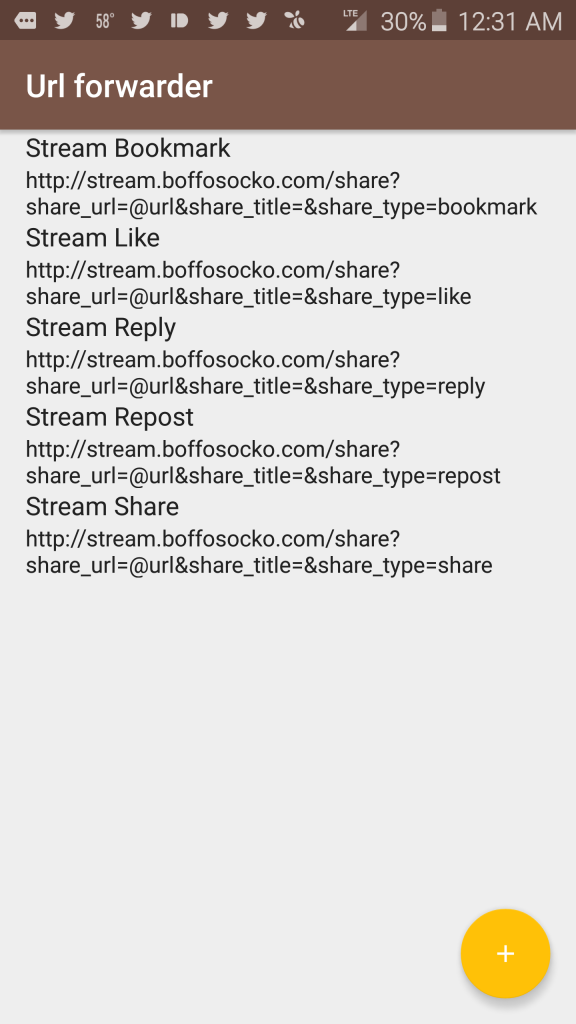
Screenshot Screenshot 2

Nota bene: I'm using the KnownReactions plugin to provide functionality for the "like" and "repost" types and that without it, these action types won't function properly on your Known installation.

Those at Known, are more than welcome to freely cut/paste/modify this for potential inclusion into their documentation for future use.

If anyone has other suggestions for improved posting via mobile, I'd certainly love to hear them!


Replied to a post on github.com :

Include IndieWeb Press This plugin · Issue #31 · indieweb/wordpress-indieweb
Would be useful to include the Press This plugin [https://github.com/pfefferle/wordpress-indieweb-press-this] as well, though keep in mind it requires WP v4.3


Kyle, you should also obviously steal any/all parts of this post for Woodwind's "manual" if you like: http://stream.boffosocko.com/2016/configuring-the-indieweb-rss-reader-woodwind-for-withknown


Configuring the #IndieWeb RSS Reader Woodwind for @WithKnown

4 min read

Woodwind (so, named because it's part of the "reed/read" family), is a nice little RSS program for following and interacting with blogs and sites as part of one's regimen.

Today, I began setting it up in conjunction with my self-hosted Known [download] site which also has Kyle Mahan's "KnownReactions" plugin installed. This plugin allows me to "like" and "repost" content on the web in addition to Known's built in "share", "bookmark", and "reply" functionality.

I played around on my Known site with some various options to configure Woodwind which has several built in reply mechanisms available:

Reply Mechanism

  Each post will have Like, Repost, and Reply buttons that will post content to your site directly via micropub. See Micropub for details.

  Clicking an indie-action link will invoke your web+action handler if registered. See indie-configfor details.

  Manually configure your own web action handlers. The placeholder {url} will be replaced with the permalink URL of each entry.

These variations are primarily based upon the type of site and architecture you're using to take the content from the reader and post it to your own site.

I tried out Micropub, which Known supports automatically, and liked the interface, but it didn't give me as much flexibility as I would have liked in terms of post types. (The stars it posts up for likes are a tad unwieldly too.) I'm honestly not sure if Known supports the Indie-config option, though my guess is that it doesn't. (I'm thinking that building a WordPress plugin to allow easy plug-and-play for Indie-config would be fun on an alternate CMS platform, but I'd guess that David Shanske likely already has.)

I finally messed around for a while with trying to get the Configurable action urls option working on my Known site. It seems to be working pretty well now, so I thought I'd pass along the very simple hack so that others who are less tenatious can relatively easily cut and paste the solution to get their Woodwind configuration humming more quickly.

Each action get's a title, which appears on the associated buttons within Woodwind, which is followed by a custom url.  I'll list the most common ones for Known below:

One need only to replace `www.yoursitenamehere.com` with the appropriate site URL, thus in my case for the "Share" button, I used `http://stream.boffosocko.com/share?share_url={url}&share_title=&share_type=note`.

I imagine that one could also use this general format to create buttons within Woodwind to post comics, recipes, and even reviews using the community plugins for Known, though it's likely that some of these plugins may need some tweaks to work properly.

Again, I'll note that I'm using the KnownReactions plugin to provide functionality for the "like" and "repost" types and that without it, these buttons won't function properly on your installation.

Those at Known, are more than welcome to freely cut/paste/modify this for potential inclusion into their documentation for future use.


Kyle Mahan's post: I was not expecting to have a long conversation with my therapist today about why it's important to me to have my own website


Tino Kremer's post on tinokremer.nl: 235 Days on the Indieweb; something changed


Installed great plugins into my @withknown site: Recipes, Reviews, Reactions, Video via http://docs.withknown.com/en/latest/plugins/community/ h/t @tinokremer


Installed @kylewmahan's excellent plugin for @withknown: KnownReactions


Congratulations and good luck. Hopefully you won't be as addicted to the as some of us have become!


Thanks @tinokremer. I was just noodling around with one @kylewmahan & @schnarfed recommended for @WithKnown and having issues. I'm hoping to get it sorted as it's one of the daily stumbling blocks I encounter with respect to on mobile.


@withknown has a great bookmarklet for web, but what's best similar method to share on mobile? Is there an Android share app?


@benwerd Let us know if you need a side of to go with your ! @boffosockobooks


Finally upgraded to @WithKnown 0.9.1 "Derbyshire" release https://withknown.com/opensource/


@georgkaser From an infection standpoint if @wordpress put webmentions in core, they'd automatically win.


Another reason to join the by @xeni: A copyright troll took down one of our favorite Tumblrs http://boingboing.net/2016/02/26/a-copyright-troll.html