@JohnWFarrell Curious if you use any book related social media sites like GoodReads.com?


Replied to a post on github.com :

You could start with http://indiewebcamp.com/Getting_Started_on_WordPress which will walk you through most of the process. You should start with the Webmention Plugin and Semantic Linkbacks to send/receive webmention support and to help comments look better respectively. Brid.gy connects your blog to responses from sites such as Facebook, Twitter, et al.

Keep in mind that some of the other plugins you'll run across may have small bugs or quirks as they're being actively developed. Most of the plugins in the WordPress.org repository are usually more stable than some you'll run across on GitHub, but those also are dated in terms of development work, so you'll have a better idea how current they are. You can usually find one or more of us via IRC, or in social media if you need help.


#IndieWeb Raison d'etre #55: Freedom of the press trumps atrocious comment moderation

2 min read

Last week I wrote up "Some Thoughts on Academic Publishing" after reading “Who’s downloading pirated papers? Everyone” from Science | AAAS which made some heavy rounds in social media, particularly in academic spheres. Originally I began typing my thoughts/comments into the Disqus box on their website. After getting to the third graph, I began thinking, I should be writing this on my own website as a standalone comment/piece of content and just POSSE it over to their Disqus box.

Despite the fact that the editors/moderators of one of the most venerable science journals of our day will allow internet trolls like CPO_C_Ryback and CPO_C_Rybacks_Mother to go thirty rounds on nearly every comment on their featured piece for the week, my slightly more tempered comment is still sitting in their moderation queue untouched. 

My poor pending commentary

Fortunately I had the foresight to have self-published it before hand, or the not-insignificant time I spent thinking and writing about the topic at hand would have been gone the moment I pressed send. It's one thing to get lost in the shuffle of hundreds of comments amidst trolls, it's another thing altogether to be moderated out of existence. The IndieWeb movement has prevented me from feeling like I did two decades ago after writing a term paper for hours only to lose it after discovering that I hadn't hit control-s to save what I'd written. The additional benefit was that I was able to post those same thoughts on multiple other networks effortlessly while still being able to own what I'd originally written.

The greatest irony of the whole affair is that in conjunction with the particular article I was commenting on, Marcia McNutt, Editor-in-Chief Science Journals, published a companion piece about the high costs and attention to detail and quality that journals try to maintain in their digital presence. Apparently this massive expense and terrific effort doesn't go as far as preventing internet trolls like those mentioned from running roughshod over their own site (which is "moderated" by the way) while keeping out commentary that may add to the discussion and community that they're apparently not attempting to foster.


Celebrate Claude Shannon's 100th birthday by reading his thesis that began the digital era https://dspace.mit.edu/handle/1721.1/11173 https://pbs.twimg.com/media/Bmeohk1CUAAGSQk.jpg


Replied to a post on hyp.is :

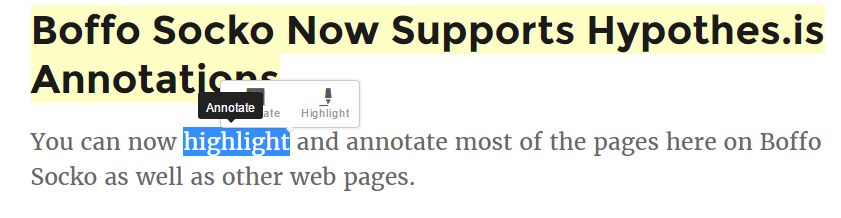
On the topic of extrapolating where some of this is going, there's also a pending UI issue amongst competing annotation platforms. They're going to need to watch where they put their overlays for annotating/highlighting or they aren't going to work together well. Not to mention other social media plugins that have similar popups for highlighting and sharing.
http://boffosocko.com/wp-content/uploads/2016/04/NewsGenius-vs-Hypothesis.png


Posted on 3/24/16:
@Kathryn and Ola, thanks for the tweaks and the child theme! I hope that Ola is dumping the code back to Sarah [https://github.com/sarahmonster/pique] or wherever you keep it internally, so that Woo support is at least partially baked in when it's released to the .org side. I'm sure it may be on the theme's internal roadmap, but don't forget to declare WooCommerce support in functions.php when the final version is rolled out.

I particularly liked the careful thought to keep the theme's buttons consistent as well as the change from 3 columns of products instead of 4. The only tweak I might further suggest is the color of the "add to cart", "proceed to checkout", and "pay" buttons (see http://boffosockobooks.com/product/amerikan-krazy/ which I've not restyled presently to highlight the existence) which all appear as purple [#a46497]. (Though the purple helps to highlight them, I wanted to make sure it was a conscious design choice rather than an oversight.) Either way, throwing the CSS code for the changes on these directly into the bundle makes it much easier for less sophisticated users to tweak the code later.

Other than that, I've looked through most portions fairly carefully and everything seems to be working as I'd expect it to without any glaring issues/errors. My thanks to you, Sarah, and Ola for the beautiful work that went into this as well as the after-the-fact adjustments.

@stephenwrks, A few things in the theme that you might consider taking advantage of and using on your current page are increasing the featured image opacity (25, 50, 75, or 100%) of the photos using the theme customizer/theme options/panels 1-8. This will let you "brighten" up your page without making the foreground text difficult to read and highlight the beauty of your photos.

You might also consider creating a secondary menu called "social" in the menu interface with custom items being links to your social media sites and then in the customizer/menu section setting the footer menu to use this menu. Then your social media bugs will appear in the footer of the page rather than into the second widget where it's at now. This will help streamline and balance out your page a bit (See the Custom Menus section at https://theme.wordpress.com/themes/pique/ and https://en.support.wordpress.com/menus/social-links-menu/ for more details.)


Replied to a post on github.com :

Today, I started experimenting using SNAP as part of my POSSE regimen and noticed the following quirk with syndication-links installed:

![snap duplication](https://cloud.githubusercontent.com/assets/5882943/13942624/b7061eaa-efb1-11e5-9ee9-837ee4f46c59.PNG)

SNAP seems to be adding the top line saying "Also on" along with the three written text social networks Facebook, Tumblr, and Twitter (verified by disabling SNAP), while syndication-links plugin adds the bottom line saying "Syndicated to:" followed by the much prettier social media icons. (For comparison, the Google+ and LinkedIn icons are as a result of manually placing the URLs into syndication-links's box on the post's editor.)

Naturally, I'd much prefer (and I'm sure most others would as well) syndication-links's method of output given that it's more flexible and customizable. The question is how can one hide/disable the output from SNAP, but while still keeping the additional URL data they're backporting from POSSE for display into syndication-links?

Is it worth adding a configuration toggle in the settings to disable the SNAP output version for future cases/conflicts like this?


Replied to a post on github.com :

@kylewm RE: Archaeology - This was actually the _easy_ part and is one of the greatest values of webmentions in general: once I'd found/seen the original post, having access to all the comments & mentions of that post in social media and other locations actually made it a no-brainer to find the conversation with the solution! (Though I do notice that there's a display issue on that original post with how my more recent webmentions from Known are showing up -- but that's another problem altogether.)


A Virtual Trip Through Amazon’s Physical Store - The New York Times http://www.nytimes.com/2016/03/12/business/media/a-virtual-trip-through-amazons-physical-store.html


How to find/create a URL to a status update post on LinkedIn

In addition to the manual method mentioned by Brannigan (on 7/14/15) [http://community.linkedin.com/questions/135682/url-for-a-status-update.html] one can also use a "stem" URL to which must be added a unique topic ID number corresponding to the particular post.

The two "stem" URL formats are as follows:
https://www.linkedin.com/nhome/updates?topic=XXXXX
https://www.linkedin.com/hp/update/urn:li:activity:XXXXX
Where the XXXXX indicates the topic ID number that is unique to each post.

To get this ID number:
* Find the post (either natively or on their own page by using the menubar: Profile / My Updates).
* Then highlight the word "share" in the bottom of the post and right click "Inspect" (in Chrome, though other browsers allow means of viewing source code/CSS for pages as well, see also firebug for Firefox).
* The topic ID will appear just below the <span> for the share button in the <form class="comment-box"> tag.
* Take the topic ID number and replace the XXXXX with it at the end of one of the two stem URL's above and you've now got a direct URL for your particular status update.

Example: https://www.linkedin.com/nhome/updates?topic=6103960927751651328

Naturally, it would be far better if LinkedIn would just wrap a direct anchor tag around one of the post elements so it could be more easily cut and pasted when necessary. (Facebook, Twitter, Google+, and most other social media networks do this or even provide embed code to make it easier.)

I'll also note for those with programming skills that LinkedIn provides at least limited API access for posting updates and returning the resulting URL. The opensource Known platform uses it and there's a plugin available on Github with sample code for those who might appreciate it: https://github.com/mapkyca/KnownLinkedin


How have I not already been following Meg James @MegJamesLAT for coverage of corporate media and the business of TV?


+John Baez "When in doubt, Goole it out." G+ defaults to have jetpack cross posts only seen by you (private rather than public). You can change this by following the details at https://jetpack.me/support/publicize/google/ and following the instructions under "Changing who can see your Publicized posts on Google+". For self-hosted blogs, you're somewhat limited in what/how things get posted to G+, most of them tend to be the "title" and the "excerpt" portions of your post, though within the publicize portion of the "publish" block, you can also enter a custom message that will override the "title" if you wish. You also have the option to add a "featured image" as well that will add some visual interest. From self-hosted blogs you can use modules like "All in one SEO pack" to better customize what gets ported over to social media platforms.

Ideally, you should be able to post enough to help remind your obviously devoted G+ following to click through and read the details on your blog, so that your readership doesn't suffer as much as going cold turkey. Those who are seriously engaged will take the G+ posts as a reminder to come and read your material (and honestly this is most of the reason that platforms like Facebook and Twitter took off in the first place.) Given your reach here, you might also find it easy enough to get a Twitter account, plug in your addressbook and mass-follow those you know and similarly "ghost" post to Twitter as well. You may find that you can vastly improve your reach and readership doing this.

Naturally, if you wanted to, you could manually cut and paste most/all of your entire post with a link to your blog, but this is probably more time intensive than you'd prefer.

From a PR perspective, you're taking back most of your "John Baez Brand" from Google and moving it to something you directly own and control. I'd also recommend that you encourage your readers to go to the siderail of your blog and simply sign up via email as I'm sure most all of them live as much in email as anything else. Then instead of relying on not missing anything in the flowing stream of G+, they'll get a physical notification of everything you post and have the option of not missing as much.

Feel free to call if you need specific help. I hope I'm easily enough found on the web.


+Mark van Walraven To strip cruft (ads, widgets, and other distractions) off of blog articles and general web pages for a cleaner and easier reading/concentrating experience, you might consider using Readability, which has a handy bookmarklet that you can put in your browser toolbar for quick and easy use: https://www.readability.com/bookmarklets. If you're an avid Evernote user, they have a product called Clearly that's pretty good as well: https://evernote.com/clearly/. Similarly Pocket and Instapaper have this type of functionality (with bookmarklets as well), though they typically require one to save articles to one's account first prior to reading, though this is rather handy when skimming through G+, Twitter, and Facebook feeds for interesting material one wants to read later.

+John Baez For RSS, the heir apparent to Google Reader's old product is Feedly (http://feedly.com/). There are certainly a small handful of others, but I suspect most would say that Feedly is the clear winner. They use a freemium model in which they give the majority of their useful functionality away for free and charge a small and reasonably modest subscription fee for a set of advanced functionality that most probably don't need or use. If you want to add a simple Feedly button to your blog siderail (via widget), you can find details and instructions here: http://feedly.com/factory.html

In a past life and as a side hobby, I spent several years running and building a large portion of social media for Johns Hopkins, so I've played with nearly every platform in existence. I've been pecking away for a while at blog post describing how researchers and academics can best use blogging and social media presence to improve their work & speed up their workflow - a topic that could actually be a reasonable sized book. Some of the commentary here has motivated me to get back to it presently.


Replied to a post on github.com :

If you haven't found your solution yet, make sure you kept your config.ini file safe too... I think I had this issue once with the homepage showing, but 404s on all the rest as a result of overwriting it.

For self-hosting updates take a peek at:
http://stream.boffosocko.com/2015/updating-withknown-past-077-and-keeping-social-media-integration and/or
http://stream.boffosocko.com/2015/upgrading-withknown-on-ones-own-server